Simplify your lawn care and landscape scheduling with our user-friendly software. Easily manage appointments, track job progress, and grow your business efficiently.

Lawn Care and Landscape Scheduling Software
Top Lawn & Landscape Scheduling Software Features

Customization Options
Custom Lawn Care & Landscape Scheduling
Customization Options for Scheduling
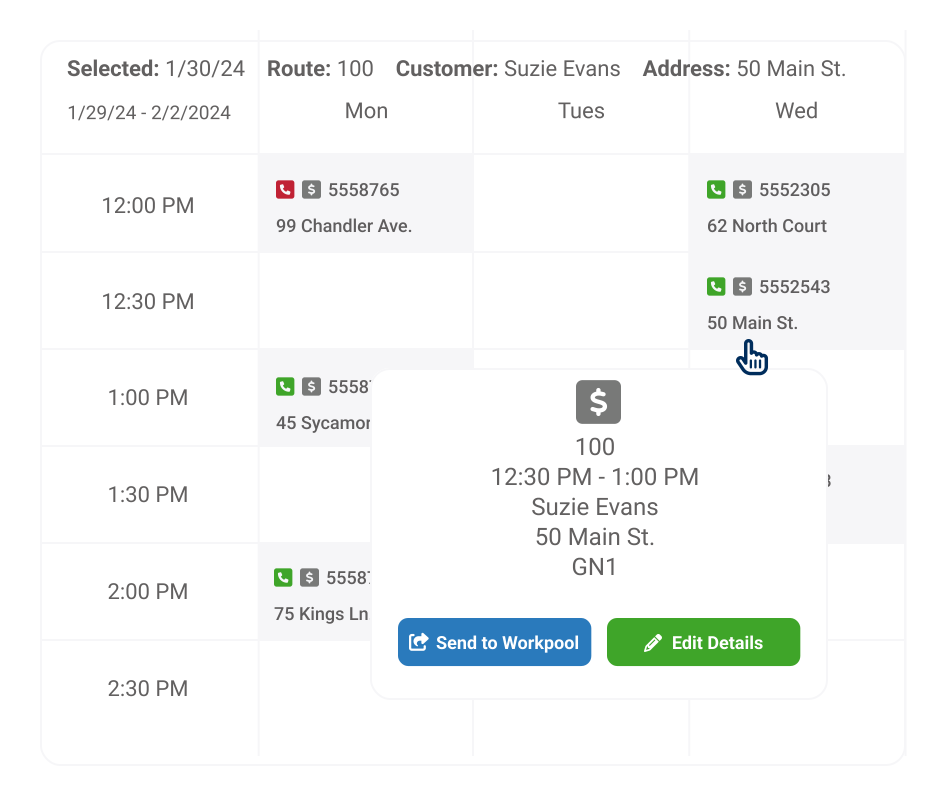
- Establish flexible scheduling choices for recurring maintenance or multiple visits.
- Schedule appointments according to a specific time frame or window or designate tasks as flexible
- Define default schedules tailored to specific services and customers
- Adjust appointment pricing and duration based on the actual service time

Simplified Scheduling

Work Order Scheduling
Efficient, Easy Scheduling
- Plan schedules in batches
- Easily reassign services to different days or technicians
- Balance technician workloads
- Account for customer, technician, and business constraints

Greater Flexibility
Lawn Job Tracking
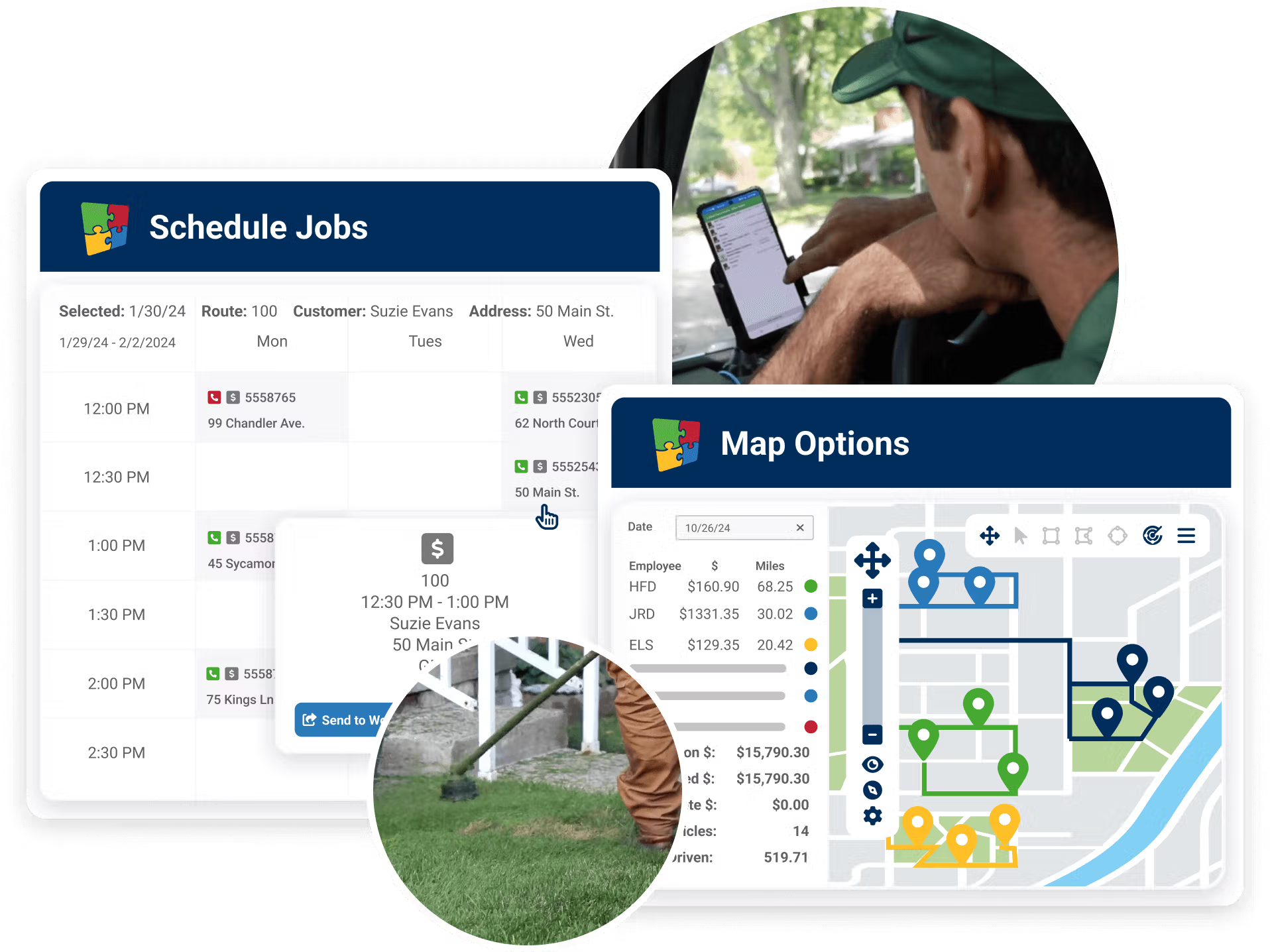
Get the Full Picture of Your Schedule
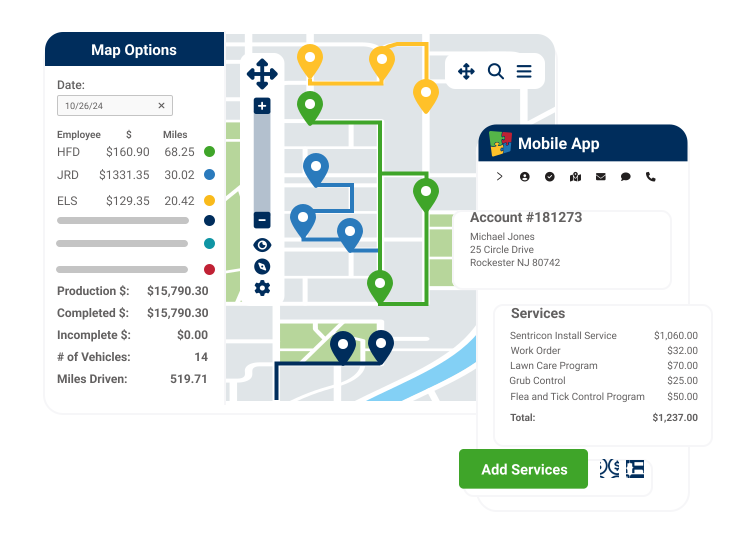
- View all appointments and easily track and report on progress and service completion
- See appointments alongside technician location with the integrated GPS map
- Use the mobile app to track your technicians’ progress and alert customers of any changes
- Customers can view scheduled orders directly through the customer portal
A Trusted Solution

"You’d need to purchase four or five different systems to get the same experience as RealGreen. This software gets it done much easier than others where you have to jump around."
Andrew Burkey, Director of Call Center Operations, Experigreen
"The way we can communicate with our customers gives us versatility that competitors don’t have: If customers prefer to receive an email or text message, two days prior to service or the day of, we have all of those abilities built-in within the system."
Richard DeWolf, Director of Business Solutions, Senske Services

"In 2011, we had four employees. We were a half-million dollar company. By 2022, we had 50 employees and were a $5 million company. I think that tells you how much we have grown. It’s with RealGreen’s help that it was able to happen."
Bob Brower, General Manager, Lawn Plus
"As we kept growing and servicing different customers, we branched out and started providing more to our clients. Managing everything manually or with spreadsheets would be nearly impossible. This has been huge for ensuring we don't miss services."
James Manske, CEO Elkhorn Lawn Care
Top Customers








Built to Scale With Your Green Industry Business
RealGreen’s all-inclusive platform provides everything you need to run and grow your business in one place — but we’re far from one-size-fits-all. We offer the most flexible, customizable and robust green industry software. Designed to fit your needs, we offer a range of packages and pricing options, both usage and user-based. Contact us today to get a custom quote for your business.
Small Business
Manage your lawn business all in one place, from any desktop or mobile device.
Ideal for 3 crews or more
KEY FEATURES

Full CRM
Online Measuring
Scheduling & Work Orders
Dynamic Routing
Mobile App
Customer Notifications
Customer Portal
Email Marketing
Digital Marketing
Integrated Payments
Sales Chatbot
Professional
Designed to give your business what it needs to grow faster than the competition.
KEY FEATURES
Full CRM
Online Measuring
Scheduling & Work Orders
Dynamic Routing
Mobile App
Customer Notifications
Customer Portal
Email Marketing
Digital Marketing
Integrated Payments
Pay Over Time Solutions
Capital Solutions
Advanced Reporting
API Integration
Enterprise
Unlimited licenses to expand your business and maximize your money.
KEY FEATURES
Full CRM
Online Measuring
Scheduling & Work Orders
Dynamic Routing
Mobile App
Customer Notifications
Customer Portal
Email Marketing
Digital Marketing
Integrated Payments
Pay Over Time Solutions
Capital Solutions
Advanced Reporting
Advanced API Integration
Advanced Analytics Integrations
Professional Services
An all-in-one platform with the features you need for every stage of your growth.
Tap each feature for a description
Acquisition Support
Streamline your processes across multiple acquisitions with software that's built to scale
Self-Service & Pay
Allow customers to pay online, prepay and order additional services 24/7 without calling your office
Estimates & Digital Forms
Easy-to-use RealGreen Forms lets you import, track and manage your own customized digital business forms and collect digital signatures.
Direct Mail & Print
Help your staff gather more leads and close more sales with professional-looking packaged print communications.
Website Builder
Get a website that showcases your business and turns visitors into customers
Online Reviews
Generate positive reviews fast -- with quick setup and almost no effort
Live Truck Tracking
Easily see where your crews are, any time.
Turn-by-Turn Navigation
Make sure your techs never get lost with turn-by-turn navigation
Email/SMS Payment Notification
Set-it-and-forget-it auto-generated email and SMS communications.
Invoicing and Auto-Billing
Integrated invoicing and automated billing reduces late and missed payments
Payment Processing
Access quotes, billing and invoicing with one click of a button. Payment processing allow clients to easily pay-as-they-go, pre-pay or auto-pay
WorkWave Capital
Smart, flexible financing options for business capital when you need it most
Property Inventory Tracking
Store attributes of a property to successfully price a job and estimate labor hours
Custom Reporting
Sales, cancellations, financial, inventory and time/cost reports are only a few of the available reporting capabilities built for your growth.

We have the solution for you.
FAQ
What is RealGreen's scheduling software?
RealGreen's scheduling tools let you schedule unlimited service programs and jobs, add same-day services on the fly and manage work orders across multiple crews, all from one platform.
How does RealGreen scheduling integrate with routing?
Scheduling and Dynamic Routing are fully integrated. When you schedule jobs, RealGreen can automatically build the most efficient route, reducing drive time and increasing the number of profitable stops per day.
Can RealGreen handle seasonal schedule changes and recurring service frequencies?
Yes. You can set programs with time-bound frequencies, such as bi-weekly in spring, weekly in summer and back to bi-weekly in fall. For applications like fertilization, you define cycle day ranges so the system does not over-service. Association rules let you tie related services together so they are always scheduled on the same visit, with exceptions easy to make as needed.
How does RealGreen handle crew scheduling vs. individual technician scheduling?
Routes can be assigned to individual technicians or to crew trucks, with jobs assigned by technician skills, licensing, availability and geographic area. For multi-person crews, one mobile license covers the whole crew, and the crew leader manages time for everyone. Best Fit scheduling scans all technician calendars and recommends optimal appointment times for new customers, showing the added drive time each option would create.
Can I add same-day service calls and handle unscheduled callbacks or urgent requests?
Yes. You can add new customers or service calls to an existing route instantly, even mid-day, and technicians receive real-time updates through the RealGreen mobile app so they never miss a new stop. Callbacks can be sent to Best Fit scheduling for instant placement recommendations, or added to a work pool and dragged onto the calendar when ready. Sales priority rules prevent new customers from waiting too long, with requirements such as new sales must be serviced within a set number of days. ASAP flags ensure urgent customers get priority scheduling to reduce cancellation risk.
Can a technician reschedule or reassign a job from the mobile app on-site?
Yes, when the office grants that permission. In the RealGreen mobile app, a technician can open Modify Route to reassign a stop to another technician or route, reschedule it to a different day, or mark it non-serviceable with a reason. Services on a non-serviceable job can be reset later by the office. Every change syncs back to the back office in real time, so dispatch sees the update without a phone call.
How does scheduling handle no-access issues (locked gates, dogs, gate codes) at the point of booking?
Access details live on the customer record rather than in a technician's memory. RealGreen supports customizable note and property fields for gate access, pets and entry instructions, and the technician can pull those notes up in one click from the job screen in the mobile app. Automated pre-service email and SMS notifications go out ahead of the visit so customers can unlock a gate or secure a dog. If the stop still cannot be serviced, either the technician or the back office can mark it non-serviceable and then reschedule it.
Can one-time installation jobs and recurring maintenance visits live on the same calendar for the same customer?
Yes. One customer can carry a recurring maintenance program and one-time jobs or work orders on the same account and the same schedule. One-time installation or repair work is scheduled as its own job and can be routed independently or placed on the same visit as a scheduled round using association rules, which tie related services together so they are always produced on the same stop.
Does the schedule sync with technicians' personal or third-party calendars?
RealGreen does not push routes into personal calendars such as Google Calendar or Outlook. Technicians work from the RealGreen mobile app, which stays in sync with the office schedule in real time, so there is one authoritative schedule instead of a copy that can drift out of date. Businesses that need schedule data in another system can move it through the RealGreen API.
How are cancellations or no-shows automatically handled in the schedule?
When a service or program is cancelled, the remaining scheduled rounds come off the route so no crew is dispatched to an inactive stop. Cancellations a customer submits through the customer portal sync back to the office immediately. Stops the crew could not complete are marked non-serviceable, and the office can reset the service and place it through Best Fit scheduling or hold it in a work pool. Cancellation reporting tracks the reasons over time.
Ready to Grow?
Interested in learning how to grow your lawn business and better serve your customers? Check out our resources!